
Connection Data
The datasqill Server and datasqill modules do not store connection data to the datasqill repository or to external systems. Instead, they use logical connections that are supplemented with concrete data at runtime.
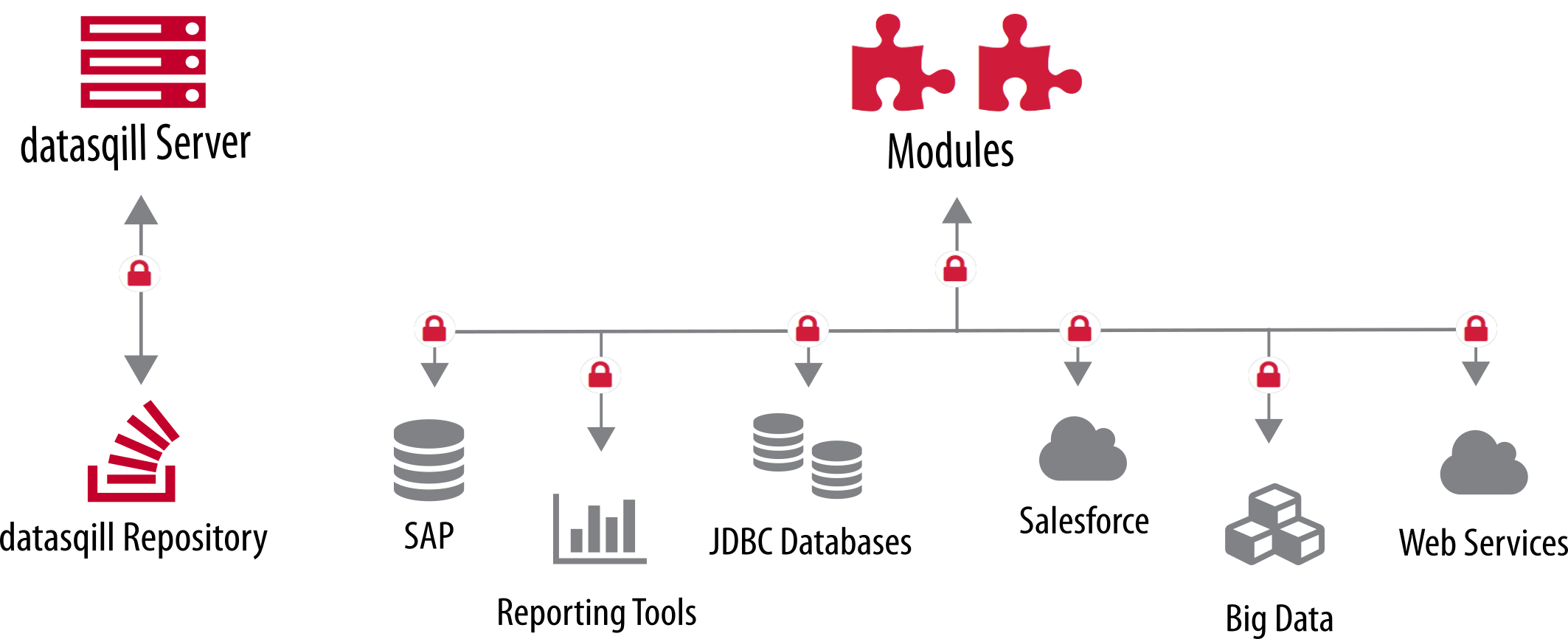
The access data include among others:
- JDBC URLs
- JDBC Parameters
- Web Service URLs
- Web Service Parameters
- User IDs
- Passwords
The datasqill Server and datasqill modules use a program that provides the concrete connection data for a logical connection.
This concept has several advantages:
- no access data is stored in the datasqill repository,
- connection data are defined for each transformation environment, and
- the program can be replaced individually by custom implementations.
Point 1 ensures, as already described, that datasqill does not store any access data.
Through 2, logical connections are provided with different concrete connection data on each transformation environment. This allows, for example, test instances of external systems to be used on a test environment while production external systems are connected for production. The datasqill "code" that is rolled out from system to system remains unchanged through the use of logical connection data.
Customers with specific requirements for security and storage of sensitive data can replace the standard implementation with their own solution per point 3. This can retrieve the access data from a secure storage medium or from a secured server and provide it to datasqill.
Logical Connections
The names of logical connections begin with SQTS_DB_ followed by a sequence number, SQTS_DB_0, SQTS_DB_1, etc.
The logical connections are created or modified in the datasqill GUI. For each transformation environment, the connection settings can be found in the navigation tree under Settings - Connections. A corresponding tab opens after double-clicking, in which the connections can be managed. By clicking the pencil, you can switch to edit mode to create new connections or adjust existing ones:

The connection to the datasqill repository always has the logical name SQTS_DB_0. It is immutable and is not managed in the GUI.
The other connections are assigned a sequence number (ID) in the GUI (1, 2, ...) and then have corresponding names (SQTS_DB_1, SQTS_DB_2, ...).
Call and Interface
The program is found with the help of a Java property that is passed as a start parameter when the server or a module starts.
The interface for the program that looks up the connection data looks like this. When the program is called with the logical connection name as parameter, it writes the associated connection data to standard output. These outputs contain the following columns, each separated by a pipe symbol:
Url|User ID|Parameters|Password
for example
jdbc:h2:tcp:localhost/datasqill;AUTOCOMMIT=false;SCHEMA=DATASQILL_REPOSITORY|datasqill_repository||XxxxxX
Standard Program "getkey"
As the default setting for looking up connection data, the "getkey" program is used, which is delivered with the datasqill installation. In this case, the start parameter looks like this:
-Dde.softquadrat.datasqill.mappertool=getkey
"getkey" uses a text file ".keyfile" that is placed in the home directory of the datasqill user on the server.
datasqill_server http://datasqill:17491/datasqill-server/service
SQTS_DB_0 jdbc:h2:tcp:localhost/datasqill;AUTOCOMMIT=false;SCHEMA=DATASQILL_REPOSITORY|datasqill_repository||XxxxxX
SQTS_DB_1 jdbc:h2:tcp:localhost/datasqill;AUTOCOMMIT=false;SCHEMA=DATASQILL_REPOSITORY|datasqill_repository_ro||YyyyyyY
SQTS_DB_2 jdbc:postgresql://datasqill-dev/softquadrat|postgres||PppppP
SQTS_DB_3 jdbc:oracle:thin:@pddemo:1521:xe|datasqill_repository||QqqqqQ
SQTS_DB_4 jdbc:exa:n0010:8563;schema=datasqill|softquadrat||EeeeeeE
SQTS_DB_5 jdbc:sqlserver://sqlserver:1433;database=datasqill|datasqill||SsssssS
SQTS_DB_6 jdbc:mysql://mysql:3306/softquadrat|root||MmmmmmM
SQTS_DB_8 jdbc:hive2://hive:10000/default|hive|metadataDatabaseID=9|HhhhhhH
SQTS_DB_9 jdbc:postgresql://datasqill-dev/softquadrat|softquadrat||PpppppP
SQTS_DB_10 jdbc:teradata://teradata/TMODE=ANSI|datasqill||TtttttT
SQTS_DB_11 jdbc:db2://db2:50000/SAMPLE:useJDBC4ColumnNameAndLabelSemantics=false;|db2inst1|db2inst1|DdddddD
The lines in the ".keyfile" text file are structured as follows:
- logical connection name e.g. SQTS_DB_0
- whitespace
- URL e.g. jdbc:h2:tcp:localhost/datasqill;AUTOCOMMIT=false;SCHEMA=DATASQILL_REPOSITORY
- pipe symbol "|"
- User ID e.g. datasqill_repository
- pipe symbol "|"
- connection parameters
- pipe symbol "|"
- password e.g. XxxxxX
A call to "getkey" could then look like this for example
$ getkey SQTS_DB_0
jdbc:h2:tcp:localhost/datasqill;AUTOCOMMIT=false;SCHEMA=DATASQILL_REPOSITORY|datasqill_repository||XxxxxX
Verification
Whether a configured connection works correctly can be verified from the console with "testJdbc.sh". A call to verify the connection SQTS_DB_1 could look like this for example:
$ testJdbc.sh SQTS_DB_1
Successfully connected to database server
Server Product Name ....... PostgreSQL
Server Product Version .... 13.4
Driver Name ............... PostgreSQL JDBC Driver
Driver Version ............ 42.2.8
Database URL .............. jdbc:postgresql://10.0.2.2/mytestdb
Database User ............. postgres
A call to the test program without parameters delivers a short help:
$ testJdbc.sh
Tests a connection from key file

Usage:
    java de.softquadrat.datasqill.utils.ConnectionTest "[optional]" key (1..n))
     options:
          -s         .... return only status for test (success, failed or unknown)

Example:
    java de.softquadrat.datasqill.utils.ConnectionTest SQTS_DB_1
Opens and tests the connection with name SQTS_DB_1
    java de.softquadrat.datasqill.utils.ConnectionTest-s SQTS_DB_1 SQTS_DB_2
Opens, tests and return only status for connections SQTS_DB_1 and SQTS_DB_2

You can overwrite the datasqill default mapper tool by:
    -Dde.softquadrat.datasqill.mappertool=mymappertool
Otherwise the default (getkey) is used