
Example Module
This chapter shows the complete process of creating a simple template for an insert from an SQL query.
Objective: The user specifies an SQL in the transformation and based on this SQL, effective SQL is generated that inserts the data into the specified target table in one statement. Additionally, the developer should have the option for Oracle databases to influence the database's approach when inserting via optimizer hints (not the behavior during Select, since this can already be specified in the transformation code)
Even though there is a specific requirement for an Oracle database here, the module works for all SQL databases. The optimizer hint is simply ignored by other databases.
Creating a Template
Let us take again the example from the introduction for the query:
SELECT vertrag_datum.id
     , vertrag_datum.datum
     , vertrag_zeit.uhrzeit
  FROM vertrag_datum
     , vertrag_zeit
 WHERE vertrag_datum.id = vertrag_zeit.id
As target, the table vertrag_datum_zeit in schema SOFTQUADRAT is again specified.
If no optimizer hint is given, the following effective SQL should be generated:
INSERT INTO SOFTQUADRAT.vertrag_datum_zeit (
       id
     , datum
     , uhrzeit
     )
SELECT vertrag_datum.id
     , vertrag_datum.datum
     , vertrag_zeit.uhrzeit
  FROM vertrag_datum
     , vertrag_zeit
 WHERE vertrag_datum.id = vertrag_zeit.id
When specifying the hint "append", the code should be generated like this:
INSERT /*+append*/ INTO SOFTQUADRAT.vertrag_datum_zeit (
       id
     , datum
     , uhrzeit
     )
SELECT vertrag_datum.id
     , vertrag_datum.datum
     , vertrag_zeit.uhrzeit
  FROM vertrag_datum
     , vertrag_zeit
 WHERE vertrag_datum.id = vertrag_zeit.id
The FreeMarker template without support for an optimizer hint could look like this:
[#include "dsmod_template.ftl"]
[#--
    Tatata mein erstes Modul
--]
INSERT INTO ${target} (
       [#list all_src as col]${col.name}[#sep]
     , [/#list]
     )
${interpret(action)}
- datasqill already has a (configurable) template that provides some functions. This is included in the first line since it later uses the interpret function defined in this template.
- The variable target is provided by the Java module and delivers the schema and table name of the target table.
- The variable all_src is a list of all source columns in the order as specified in the Select. This list is converted into a multiline comma-separated text with [#list]. With the [#sep] instruction, the last comma in the list is suppressed
- The last line simply outputs the query again, but the transformation SQL is interpreted once more so that variables can also be used there.
Now we extend the FreeMarker template with the optional optimizer hint:
[#include "dsmod_template.ftl"]
[#--
    Tatata mein erstes Modul
--]
INSERT [#if optimizer_hint?has_content]/*+${optimizer_hint}*/ [/#if]INTO ${target} (
       [#list all_src as col]${col.name}[#sep]
     , [/#list]
     )
${interpret(action)}
- If the optimizer hint was given (has_content), then the hint is inserted as an SQL comment with leading +
Use in datasqill
The following datasqill sheet is used for testing the module:
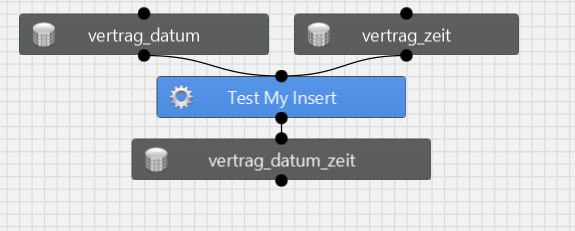
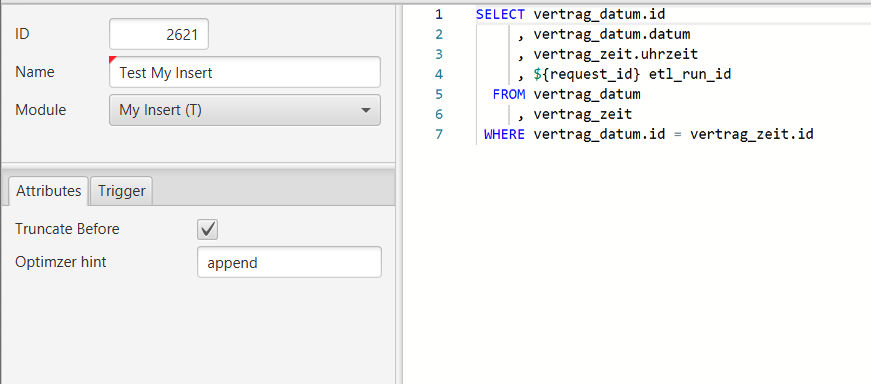
The transformation looks like this:
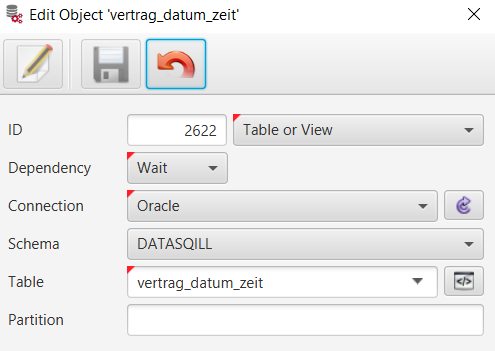
The table vertrag_datum_zeit in schema SOFTQUADRAT is specified as target.
In the GUI, the text append is entered in the optimizer_hint attribute.
When validating the transformation, the generated SQL looks like this:
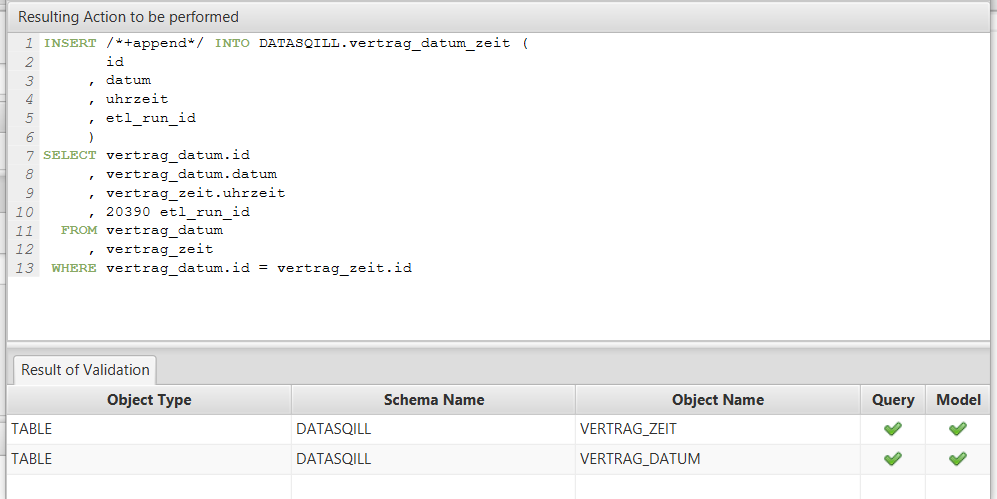
- The inserted request_id changes with each Validate
Complete Module Definition in datasqill Repository Format
And here now the complete HJSON file mod_my_ins.dsdb that defines this module.
{
  objectList:
  [
    {
      dsdbFormat: 1
      deploymentType: version
      current:
      {
        version: 4.0.2
        data:
        [
          {
            target: vv_sqts_module
            columns: [ "module", "module_name", "module_type_id", "description", "module_command", "module_action_data_type" ]
            rows: [
              [ "template_my_ins", "My Insert (T)", 2, "Insert from Select (T)", "DsModTemplateSQL", "SQL" ]
            ]
          }
          {
            target: vv_datasqill_module_trigger
            columns: [ "module", "trigger_name", "trigger_level" ]
            rows: [
              [ "template_my_ins", "After Database Open", "Connection" ]
              [ "template_my_ins", "Instead of Truncate", "Connection" ]
              [ "template_my_ins", "Before Commit", "Connection" ]
              [ "template_my_ins", "After Commit", "Connection" ]
              [ "template_my_ins", "Before Validate", "Connection" ]
              [ "template_my_ins", "After Validate", "Connection" ]
            ]
          }
          {
            target: vv_sqts_action_attr_definition
            columns: [ "action_type", "attr_name", "attr_label", "attr_data_type", "default_value", "attr_description", "attr_position" ]
            rows: [
              [ "template_my_ins", "Truncate Before", "Truncate Before", "BOOLEAN", "N", "Empty target table before", 1 ]
              [ "template_my_ins", "optimizer_hint", "Optimzer hint", "CHAR", "", "Testmodul for me", 3 ]
            ]
          }
          {
            target: vv_sqts_config_global
            columns: ["config_key1", "config_key2", "config_key3", "config_key4", "config_value", "config_sort", "config_comment"]
            rows:
            [
              [ "VARIABLE", "Template", "MODULE", "template_my_ins"
                '''
                [#include "dsmod_template.ftl"]
                [#--
                    Tatata mein erstes Modul
                --]
                INSERT [#if optimizer_hint?has_content]/*+${optimizer_hint}*/ [/#if]INTO ${target} (
                       [#list all_src as col]${col.name}[#sep]
                     , [/#list]
                     )
                ${interpret(action)}
                '''
                null, "template for insert"
              ]
            ]
          }
        ]
      }
    }
  ]
}
The module definition for this example was created in less than 30 minutes. More complex modules that, for example, need to take into account the database used (see mod_upsert.dsdb for this) naturally take a bit longer.
Deployment to the datasqill repository is done with the command
deploySchema.sh --version 0 --dbid SQTS_DB_0 < mod_my_ins.dsdb
Appendix
The following scripts for the tables to demonstrate the module:
CREATE TABLE vertrag_datum (
    id NUMBER
  , datum DATE
);

INSERT INTO vertrag_datum SELECT rownum, TRUNC(SYSDATE) - rownum FROM dual CONNECT BY rownum <= 10;

CREATE TABLE vertrag_zeit (
    id NUMBER
  , uhrzeit VARCHAR2(8)
);

INSERT INTO vertrag_zeit SELECT rownum, '10:00:' || LPAD(rownum, 2, '0') FROM dual CONNECT BY rownum <= 10;

CREATE TABLE vertrag_datum_zeit (
    id NUMBER
  , datum DATE
  , uhrzeit VARCHAR2(8)
  , etl_run_id NUMBER
);