
Dependencies
All transformations are captured in the Transformation Editor. In addition to the transformation, it is specified which sources are used and which targets a transformation writes to. Within a sheet, you can see the data flow visually and thus the order in which transformations should reasonably run so that tables are already populated before a downstream transformation starts.
The datasqill scheduler detects dependencies between transformations automatically and takes them into account in the execution order. If transformation B reads a table that transformation A writes, B waits until A has finished.
The involved transformations must be bundled in the same execution request. That happens implicitly when they sit on the same worksheet, or explicitly via a shared batch.
Dependencies do not come from the full set of modeled transformations, but from the content of the current run. If only a single transformation is started, dependencies to source tables are ignored because the writing transformations are not part of the run. Only dependencies among the transformations that will actually execute are resolved.
Dependencies exist only between transformations, but they are derived from the objects those transformations use. Rules differ within a worksheet and across worksheets.
When a run is created, dependencies are determined according to these rules and persisted in the sqts_batch_instance_dependency table. As long as not all tasks a task depends on are in status Finished, the dependent task remains in status Dependency Wait.
Dependencies within a Worksheet
There is one rule:
The execution order follows exactly from the modeled connections between the transformations (blue boxes).
If transformation B uses an object (gray box) that transformation A writes, B starts only after A has completed successfully.
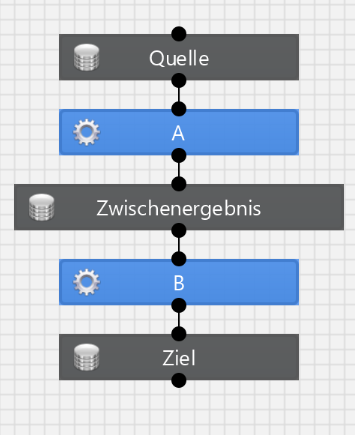
The Dependency setting on the object (Wait/Ignore) has no effect within a worksheet.
Database-level dependencies (for example a view that uses a table) are not applied within a worksheet. If Table 1 and View 1 are modeled as follows:
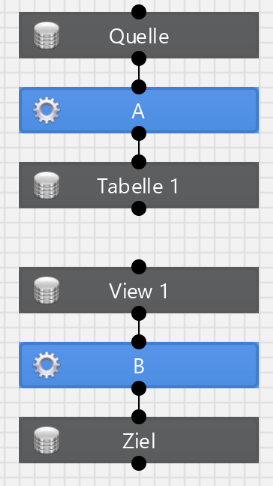
then transformations A and B run in parallel, even though the database has a dependency.
To honor that dependency, model it explicitly:
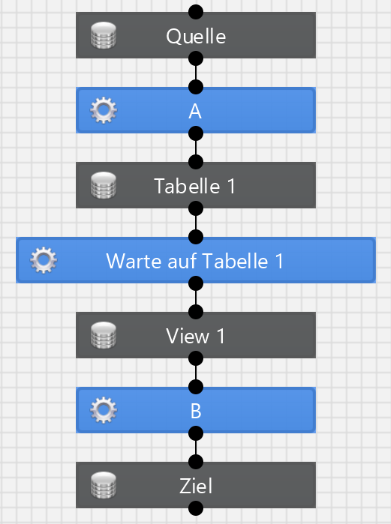
The transformation “Wait for Table 1” is a virtual transformation (type Virtual).
Objects with the Same Name
Within a worksheet, it does not matter for execution order whether the same database object (same connection, schema, and name) appears more than once on the sheet. From the run’s point of view they are different objects because they represent different states.
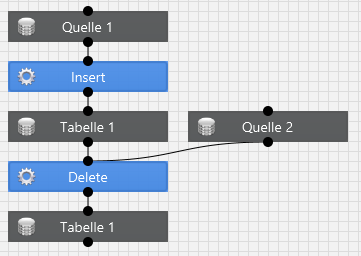
Here a table is loaded first and then some rows are deleted. The two “Table 1” objects are identical in the database but must be handled sequentially in the run. The dependency is modeled.
Without a modeled connection, the order is undefined:
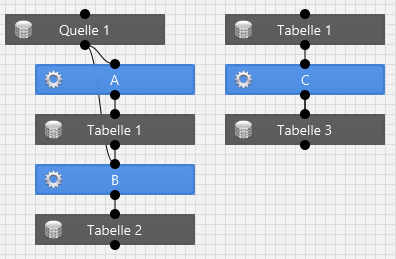
It is not guaranteed in which state transformation C finds Table 1. Transformation A may already have finished, may not have started, or may run at the same time as C. This construct is used when A and C operate on different subsets of the same table, for example a control table with a separate row per transformation.
All of these cases underline the same rule: the execution order follows exactly from the modeled connections between the transformations.
Cross-Worksheet Dependencies
Cross-worksheet dependencies are determined by name only. Currently only database objects are considered. Connection, schema, and table name must match.
Rule 1: If Dependency on the modeled object is set to Ignore, transformations that use this object do not take dependencies from other worksheets with the same name.
Rule 2: If the modeled object is written on this sheet (used as a target), transformations that use this object do not take further same-name dependencies from other worksheets.
Rule 3: In all other cases, transformations that use the object take same-name dependencies from other worksheets.
Example for Rule 2:
Worksheet 1
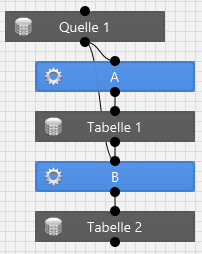
Worksheet 2
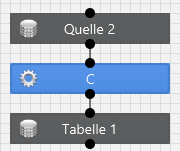
In this example, transformation B does not wait for transformation C.
Loops
If transformation A needs transformation B directly or indirectly and B needs A in return, a loop (deadlock) forms. The run completes every transformation that is outside the loop and does not wait on it. After that the overall run stays Active while the affected tasks remain in status Dependency Wait.
Resolution is manual: start the transformation that should run first in a separate run, then skip it in the blocked run with Skip Task.